


Microsoft Access is among the most used database application worldwide as users get large number of features that allow them to store and manage data in efficient manner. Records, contacts are easily maintained in Access mdb or accdb database file.
With the time, Microsoft released different versions of MS Access Application with additional features. Two file format are supported by application that are, Accdb and Mdb file format, Access 2016, 2013, 2010 and 2007 support Accdb file format and other previous versions support mdb file format. Mostly users switches from .mdb format to .accdb file format and this modification lead to corruption of database. To repair mdb or accdb file from such corruption users can use MS Access Recovery Tool.

Deeply Scan Access Files
Microsoft Access Recovery Tool fix mdb error by deep scanning the database and take effective action to recover access file without affecting accuracy and integrity of the database. All items are stored in complete hierarichal format.

Advance Recovery methods
Database files that are password protected are securely recovered by MS Access database recovery software and also maintain primary and unique keys relationship when fix access database, tables connectivity remain same so user can easily use.

Preview Items before Export
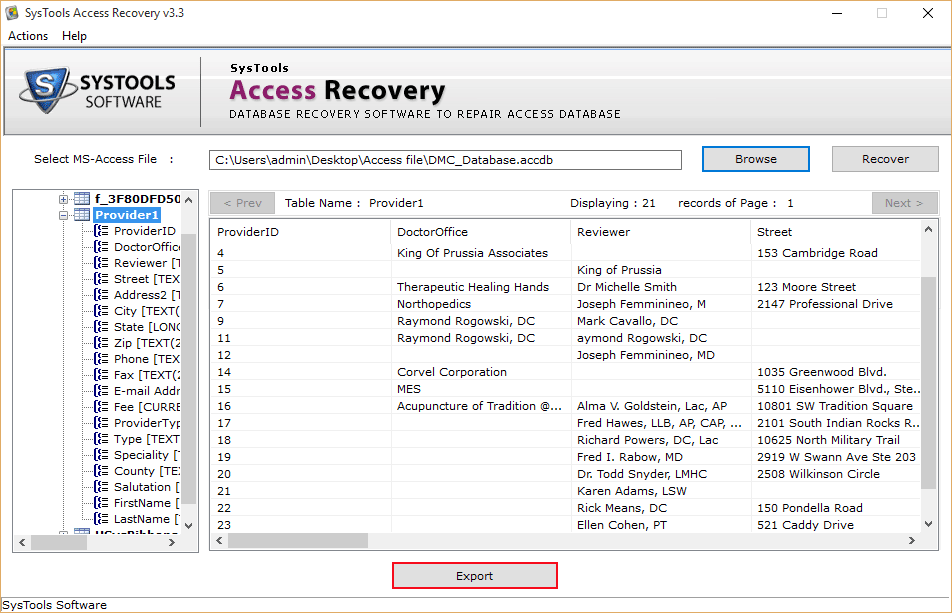
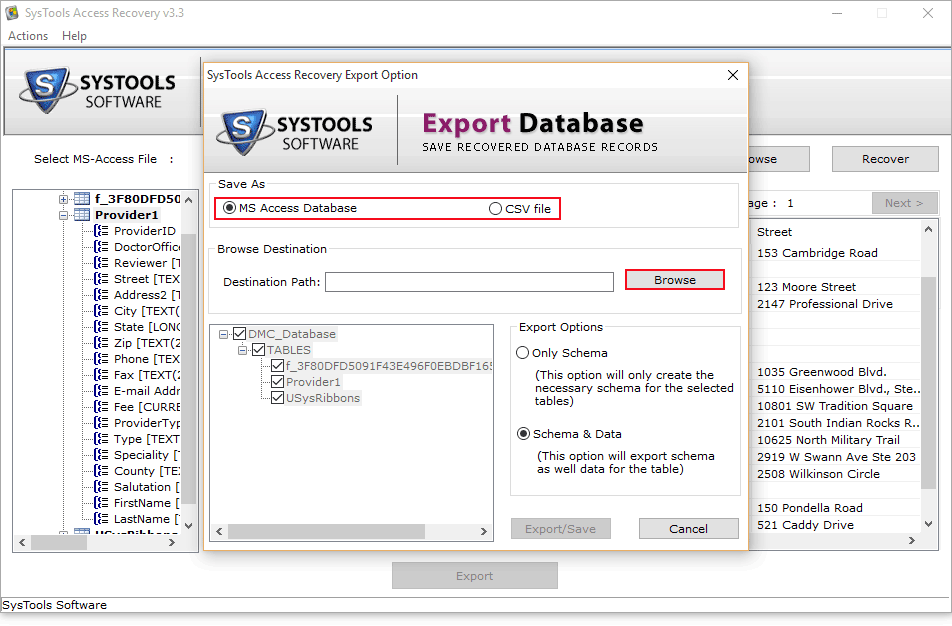
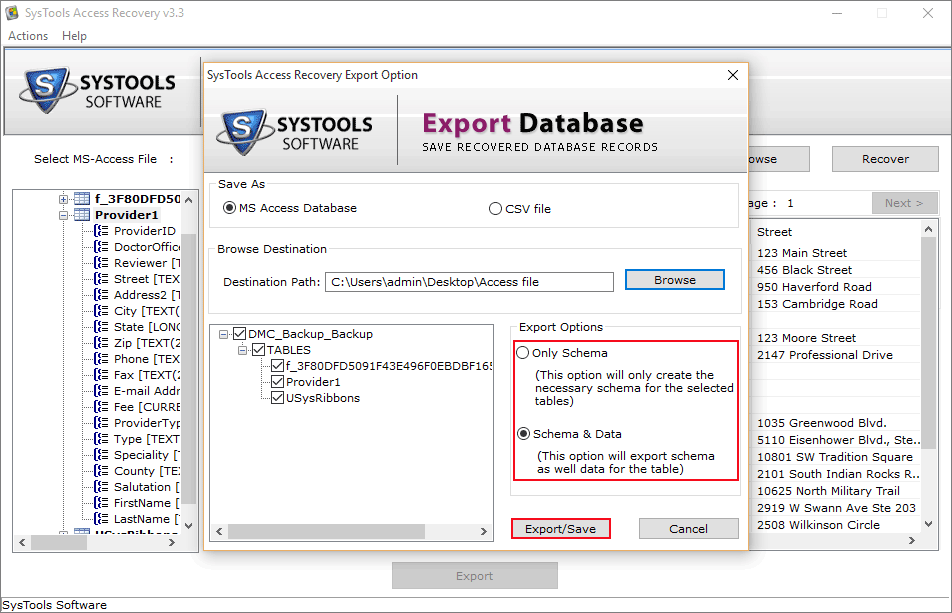
Users can also check the database items in Microsoft Access file recovery before exporting the content to the local machine, to verify accuracy of recovered data and can export database to csv or mdb format and use them without any problem.

Recover Multiple Langauage Data
MS Access Recovery Tool algorithm can also restore the outfitted information within database tables in some other language other than English. The entered information in other areal accent, no issue MDB recovery tool can get the details and repair them all.

Compatibility & Supports
The MDB recovery tool works perfectly with the concomitant Microsoft items:

Export & Save data
After fixing corrupted MDB data, the Access recovery tool gives two choices to save the repaired Access database record. You can either choose default location or choose any new path on the PC to Export & save the data.

Size 568 KB
Version 3.3
Trial Version of access database recovery tool has some restriction that it can recovers & provides the preview only.
Get Download MDB/ACCDB Recovery Tool Immediately for Free!!!!
Note:To export and use the recovered database must go with license version of the tool.
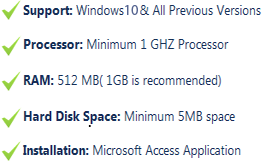
Software Requirement
Mostly access users faced file corruption issues and user do not have any idea how much these corruption can affect their Microsoft Access database. In most cases mdb database file corruption do not let the user to open Microsoft Access database file , but in some cases tables and other items of access database get corrupted and user cannot perform the task due to severely corrupted Access database worthy items.
Reasons for corruption varies, but few reasons are most common such as Virus or malware, sudden system shut down, power failure, on occurrence of these activities, accdb file corruption occurred mostly. When user faces such issues and other isssues in accessing their access database then they can use our Access recovery software to fix access mdb error and repair corrupt access mdb file items back to hard disk in few minutes. Application several features make user comfortable to work.
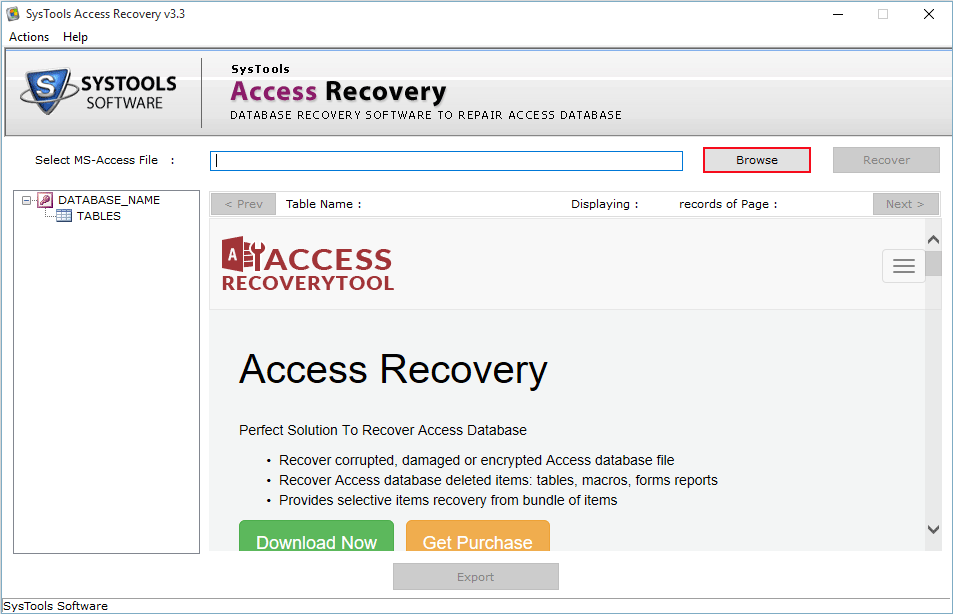
Access file items such as tables, queries, macros etc are efficiently recovered. Microsoft Access Recovery Tool is compatible with all Access versions 2013/2010/2007/2003 and previous versions. Database data does not get hampered during recovery, as mdb recovery software repair & recover only corrupted parts, does not make changes in other parts of database.......Steps to repair Access DatabaseAccess Database Repair Software developed with user friendly interface, so that user can easily use each mdb & accdb recovery tool features efficiently without any technical knowledge. User can download MS Access Database Recovery Tool demo version to check and take the test of its features.
I have the corrupt MS Access database file. I used all the techniques to repiar and recover corrupt mdb file. I contact to my DBA about how to repair ms access database file. I tried free access repair tool demo version, to take test of software's features and tool very efficiently repair my all MS Access data. After testing this MS Access datbase recovery tool, purchased full version and exported all my recovered data. The table relationship was maintained as original and data was loss.
— Comic Mag, U.S
Long time I have not worked on one of my access database mdb file and few days earlier when I was trying to access this old .mdb file was trying to open this .mdb file, I got a message 'Microsoft Access has encountered a problem and needs to close'. Each time I get the same message while openning the MS Access database file. I go through several forumns of MS Access and found that database file was corrupted due to any reason. After that I checked for any MS Access database recovery tool that helps me to repair my corrupt mdb file. After trying few of the mdb/accdb recovery tool. I found this access data recovery software best one that repair my corrupt MS Access file.
— Rikin Buttler, Australia
Recently, I found that MS access 2010 one of my databases on our shared network does not open for any user. Whenever User open the .accdb file it shows the the following error Shows "Unrecognized Database Format." error message. I can't even get it to the point of opening. Using Compact and Repair feature of MS Access was useless as it couldn't repair. I used a third party tool MDB Access database recovery that help me to repair my MS access database.
— Peter Roy, U.K
Recently, I got the following error message appears: Cannot open database "It may not be a database that your application recognizes, or the file may be corrupt. When I tried to repair this corrupt .accdb file with Compact & Repair command but it fails to repair. In this case I found this microsoft access mdb repair tool to fix access database. Which not only repair my Access file but also have several features that help to reorganise/arrange my tables, macros, forms, table relationship without disturbing the original data. It worked for me!!
— Chris Rabbada, South Africa
There are number of features that are responsible for the success of tool, these features make it best and different from other software that are available in the market.
Most of the times user is unable to locate the proper product because of number of non-trustful companies, those offer software at cheap rate and on purchasing software from those company user found himself cheated as their recovery software is in-capable to recover the files, due to all such reasons user feels fear to purchase software but now user have not to worry as our company provides complete trustful software with recovery of access corrupted data successfully without any harm to the file.
Things that user should keep in mind before purchasing Access repair software